📘 Section 1 — Introduction to C
Your first steps into C programming — from writing and compiling code to variables, I/O, and conditional logic.
🎯 What You’ll Learn
- How a C program is compiled and executed
- Program structure in C
- Output with
printfand input withscanf - Data types and variables
- Arithmetic and logical precedence
- Conditional statements (
if,else,switch)
1. Program Execution Process
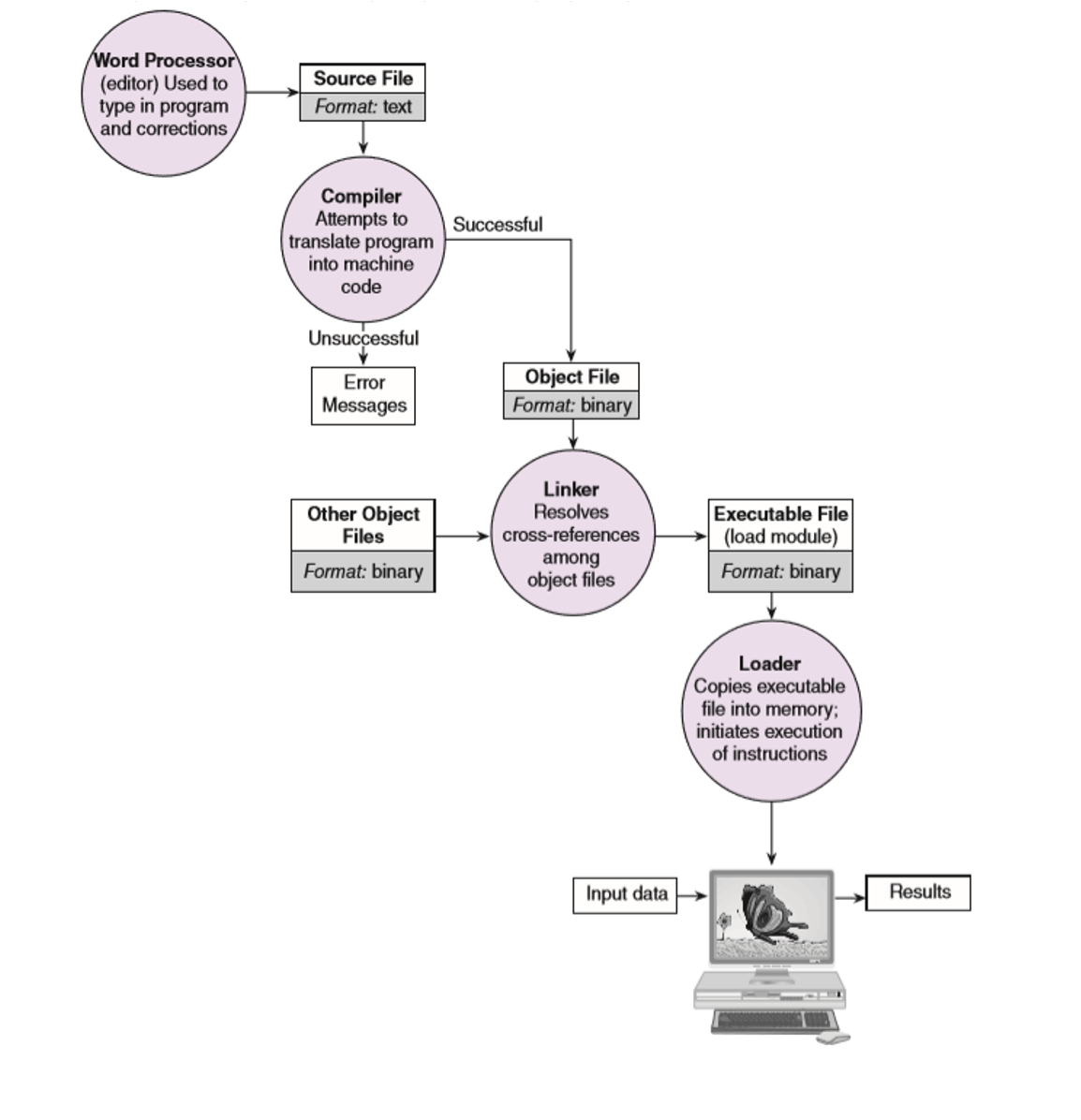
Before your code runs, it goes through several stages:
- Editor (Word Processor) — You write your source code (text format)
- Compiler — Attempts to translate your code to machine code (binary). If unsuccessful, it shows error messages
- Linker — Resolves cross references among object files
- Loader — Copies the executable file into memory and initiates execution
2. Program Structure in C
Every C program follows this basic structure:
#include <stdio.h>    // Collection of pre-compiled functions

int main() {          // Main function, where program starts
    printf("Hello World\n");
    return 0;         // Returns with code 0 (meaning the program successfully closed)
}
| Part | Purpose |
|---|---|
#include <stdio.h> |
Includes the standard I/O library (for printf, scanf, etc.) |
int main() |
The entry point of every C program |
return 0; |
Indicates successful execution |
3. Output with printf
printf is a function used to print output to the console.
printf("Hello World\n");            // Simple text
printf("I am %d years old\n", 22); // With a format specifier
Format Specifiers
| Specifier | Data Type |
|---|---|
%d |
Integer |
%f |
Float / Double |
%s |
String |
%c |
Character |
4. Data Types
| Data Type | Description | Size |
|---|---|---|
char |
Character | 1 byte |
int |
Integer | 4 bytes |
float |
Single-precision floating-point | 4 bytes |
double |
Double-precision floating-point | 8 bytes |
long long |
Long integer | 8 bytes |
unsigned int |
Unsigned integer | 4 bytes |
5. Variable Declaration and Initialization
int n;      // Declaration
n = 10;     // Initialization
The sizeof() Function
sizeof() returns the size of a data type. It can also be used with a variable.
printf("Size of int: %zu\n", sizeof(int));

int n;
printf("Size of n: %d\n", sizeof(n));
💡
%zuis a format specifier used forsize_tdata type, but it is interchangeable with%din this case.
6. Input with scanf
scanf is a function used to take input from user through the console.
int n;
scanf("%d", &n);
printf("I am %d years old.\n", n);
⚠️ Important: Be careful when using
scanfto read a variable. The&symbol must be used, which indicates “address”.
7. Arithmetic and Logical Precedence
| Precedence | Operator | Description | Associativity |
|---|---|---|---|
| 1 | ( ) |
Parenthesis | Left to right |
| 2 | * / % |
Multiplication, Division, Remainder | Left to right |
| 3 | + - |
Addition, Subtraction | Left to right |
| 4 | < <= > >= |
Relational Operators | Left to right |
| 5 | == != |
Equality Operators | Left to right |
| 6 | && |
Logical AND | Left to right |
| 7 | || |
Logical OR | Left to right |
Examples on Precedence
1)  6 != 6 < 0 || 8 == 8 > 0 && 5 != 5
2)  6 != 2 * 3 || 5 * 2 && 8 % 8
3)  3 * 4 == 12 || 6 / 2 && 8 % 4
🟢 Show Answers
Expression 1: 6 != 6 < 0 || 8 == 8 > 0 && 5 != 5
6 < 0→0,8 > 0→16 != 0→1,8 == 1→0,5 != 5→00 && 0→01 || 0→ 1
Expression 2: 6 != 2 * 3 || 5 * 2 && 8 % 8
2 * 3→6,5 * 2→10,8 % 8→06 != 6→0,10 && 0→00 || 0→ 0
Expression 3: 3 * 4 == 12 || 6 / 2 && 8 % 4
3 * 4→12,6 / 2→3,8 % 4→012 == 12→1,3 && 0→01 || 0→ 1
8. Conditional Statements
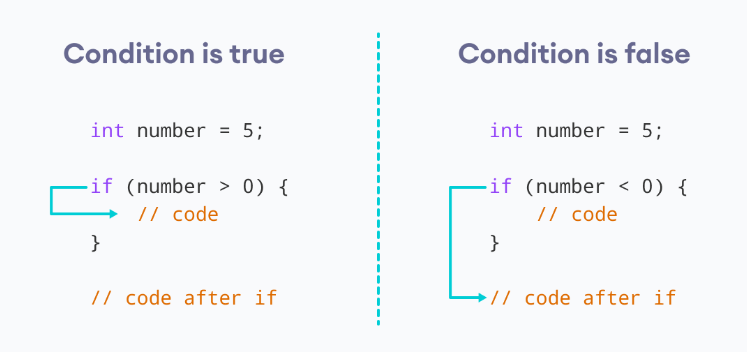
if Statement
if (condition) {
    // your code
}
A Tricky Example
int age = 20;
int x = 3;
if (age > x)
    printf("inside");
printf("outside");
🟢 What's the output?
insideoutside
Without curly braces {}, only the first statement after if is conditional. The second printf always runs.
⚠️ Lesson: Always use braces
{}to avoid confusion.
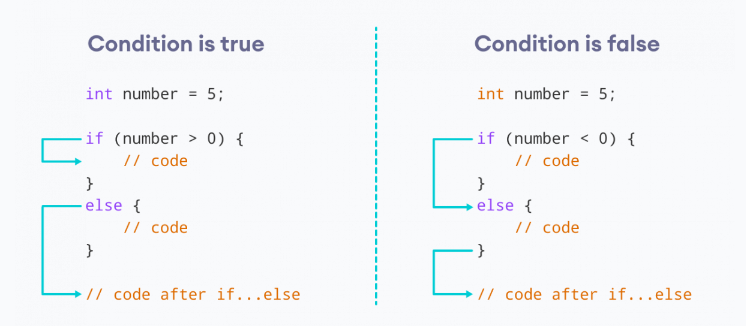
if-else Statement
if (condition) {
    // body of if
} else {
    // body of else
}
Nested if Statement
if (condition1) {
    if (condition2) {
        // statements
    }
}
switch Statement
switch (expression) {
    case constant1:
        // code
        break;
    case constant2:
        // code
        break;
    default:
        // code
}
🧪 Exercises
Exercise 1: Rectangle Area & Perimeter
Task: Design a program that accepts the length and width from the user and computes the perimeter and area of a rectangle.
💡 Hint
- Area = length × width
- Perimeter = 2 × (length + width)
- Use
floatfor the variables
🟢 Click to Show Solution
#include <stdio.h>

int main() {
    float l, w, area, perimeter;
    printf("Please enter the length: ");
    scanf("%f", &l);
    printf("Please enter the width: ");
    scanf("%f", &w);
    area = l * w;
    perimeter = (l + w) * 2;
    printf("Area = %f\nPerimeter = %f\n", area, perimeter);
    return 0;
}
Exercise 2: Celsius to Fahrenheit
Task: Write a program that takes degrees centigrade from the user and displays the same temperature in degrees Fahrenheit. The formula is: Fahrenheit = 9/5 × Centigrade + 32
💡 Hint
- Be careful with integer division!
9/5in C gives1, not1.8 - Use
9 / 5.0to force floating-point division
🟢 Click to Show Solution
#include <stdio.h>

int main() {
    float c, f;
    printf("Enter temperature in degrees Centigrade: ");
    scanf("%f", &c);

    f = 9 / 5.0 * c + 32;

    printf("Temperature in degrees Fahrenheit: %.3f\n", f);

    return 0;
}
⚠️ Why
5.0and not5? In C, dividing two integers performs integer division.9 / 5gives1. Writing5.0makes it a float, so9 / 5.0correctly gives1.8.
Exercise 3: Trace the Code
Trace the following code and determine the output.
Part A:
int a = 3, b = -5, c;
if (a < 2 * b) {
    b = a;
    c = b;
    printf("%d\n", c);
} else if (b > 0)
    b = 0;
printf("%d\n", b);
🟢 Show Answer — Part A
Output:
-5
Trace:
a = 3,b = -5a < 2 * b→3 < -10→ falseb > 0→-5 > 0→ false- Neither block runs,
bstays-5 printf("%d\n", b)prints-5
Part B:
int k, x, a;
k = 0;
a = 5;
if (k = 0)           // NOTE: This is assignment, not comparison!
    if (a > 0) {
        x = a + k;
        printf("a= %d k= %d x= %d \n", a, k, x);
    } else {
        a = k + 1;
        k = a + 1;
    }
else {
    if (a < 0)
        x = a + 1;
    else
        x = a - 1;
    printf("a= %d k= %d x= %d \n", a, k, x);
}
printf("a= %d k= %d \n", a, k);
🟢 Show Answer — Part B
Output:
a= 5 k= 0 x= 4
a= 5 k= 0
Trace:
k = 0,a = 5if (k = 0)— this is assignment, not comparison! It assigns0tok, and0is false in C- So the
elseblock runs a < 0→5 < 0→ false, sox = a - 1→x = 4- Prints
a= 5 k= 0 x= 4 - Then prints
a= 5 k= 0
⚠️ Classic trap:
k = 0(assignment) vsk == 0(comparison).
Exercise 4: Simple Calculator
Task: Write a program to input two numbers from the user and display their arithmetic results (+, -, *, /, %).
💡 Hint
- Handle division by zero
- Use
(float)n1 / n2for decimal division (type casting) - To print
%inprintf, use%%
🟢 Click to Show Solution
#include <stdio.h>

int main() {
    int n1, n2;
    printf("Enter the first number: ");
    scanf("%d", &n1);
    printf("Enter the second number: ");
    scanf("%d", &n2);

    printf("Addition: %d + %d = %d\n", n1, n2, n1 + n2);
    printf("Subtraction: %d - %d = %d\n", n1, n2, n1 - n2);
    printf("Multiplication: %d * %d = %d\n", n1, n2, n1 * n2);

    if (n2 != 0) {
        printf("Division: %d / %d = %f\n", n1, n2, (float)n1 / n2);
        printf("Modulus: %d %% %d = %d\n", n1, n2, n1 % n2);
    } else {
        printf("Division by zero is not possible.\n");
    }

    return 0;
}
Key concepts:
(float)n1 / n2— type casting forces floating-point division%%inprintf— prints a literal%symbol- Always check
n2 != 0before dividing
Exercise 5: Cartesian Plane Quadrant
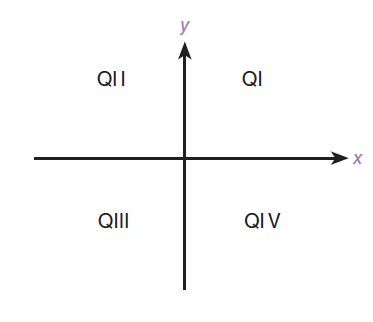
Task: Accept the x-y coordinates of a point in the Cartesian plane and print a message telling either an axis on which the point lies or the quadrant in which it is found.
Sample outputs:
(-1.0, -2.5) is in quadrant III
(0, 4.8) is on the y-axis
💡 Hint
- If both x and y are 0 → origin
- If x is 0 → y-axis
- If y is 0 → x-axis
- Otherwise, check signs to determine the quadrant (I through IV)
🟢 Click to Show Solution
#include <stdio.h>

int main() {
    double x, y;
    printf("Enter the x coordinate: ");
    scanf("%lf", &x);
    printf("Enter the y coordinate: ");
    scanf("%lf", &y);

    if (x == 0 && y == 0) {
        printf("(0,0) is at the origin");
    } else if (x == 0) {
        printf("(0,%.1f) is on the y-axis", y);
    } else if (y == 0) {
        printf("(%.1f,0) is on the x-axis", x);
    } else if (x > 0 && y > 0) {
        printf("(%.1f,%.1f) is in quadrant I", x, y);
    } else if (x < 0 && y > 0) {
        printf("(%.1f,%.1f) is in quadrant II", x, y);
    } else if (x < 0 && y < 0) {
        printf("(%.1f,%.1f) is in quadrant III", x, y);
    } else if (x > 0 && y < 0) {
        printf("(%.1f,%.1f) is in quadrant IV", x, y);
    }

    return 0;
}
💡 Key idea: Check the special cases (origin, axes) before checking quadrants. Use
%lfinscanffordouble.
⬅️ Back to Home